September 3rd, 2026
New
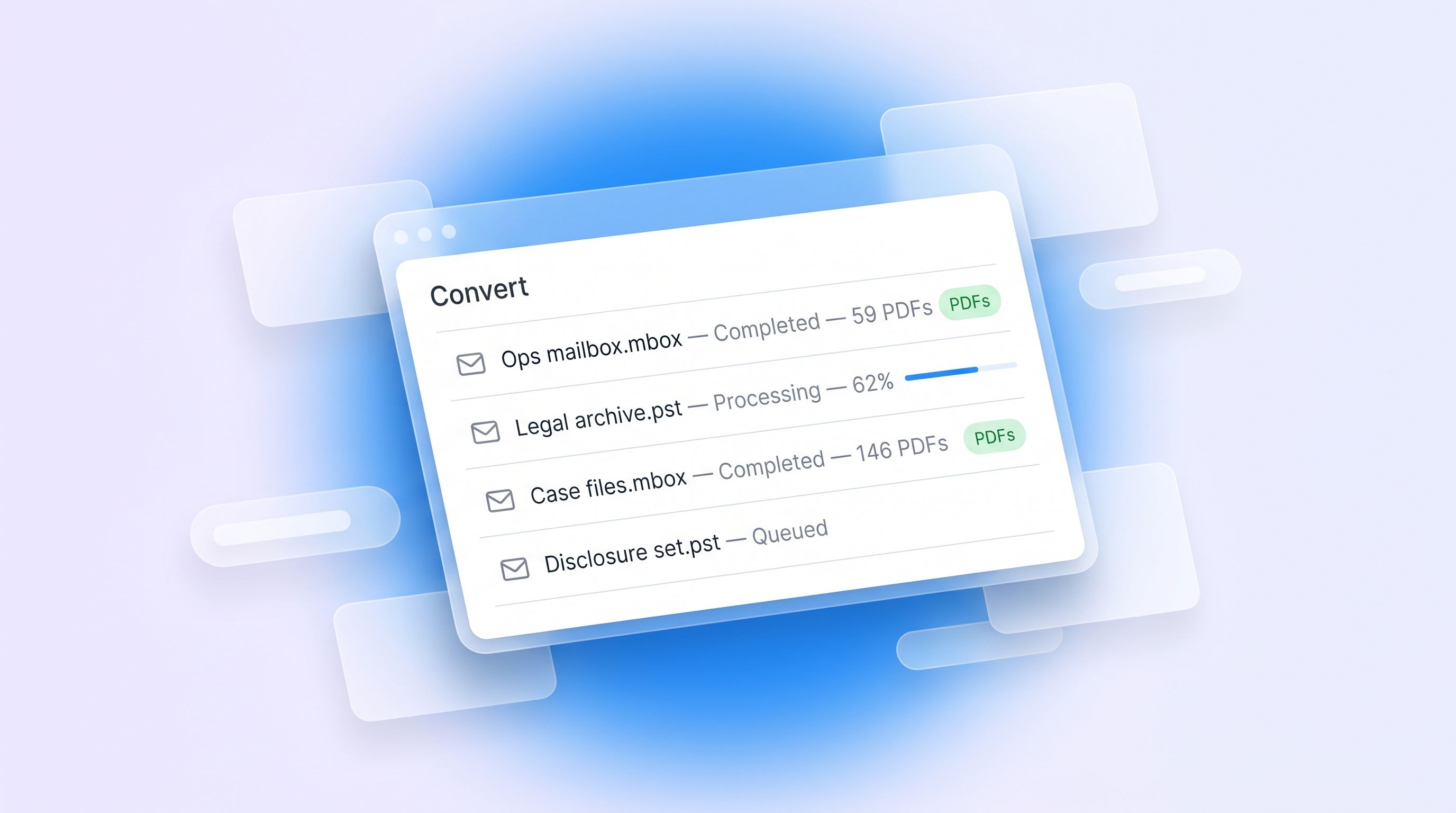
Plenty of the time you don't need to redact anything. You need a mailbox for readable documents: to send to a solicitor, to file, or to hand to someone who will never log into RedactBox.
Until now, that meant creating a project and working through a redaction flow you didn't want. Convert skips all of it.
How it works
Open Convert from your dashboard, drop in your files, and start the job. Every message becomes its own PDF, named by date and sender so the output sorts itself. Attachments come out in their original format — a spreadsheet stays a spreadsheet — saved in a folder beside the message they came from.
It runs in the background. Close the tab if you like; we'll email you a download link when it's finished, and the job page tells you which item it's on while it works.
It also flattens PDFs
Same tool, second job type: give it a PDF with form fields, annotations or layers and it burns them into the page, so nothing can be lifted back off.
What you get
A PDF per message, dated and sender-named
Attachments in their original format, beside their message
An attachment list inside each message PDF, with a copy embedded
One zip, downloadable for 7 days
Limits
Free: one file per job, up to 50 MB. Professional: up to 100 files per job, 3 GB each. Archives of several thousand messages are the normal case, not the stress case.
Worth saying plainly: Convert doesn't redact. It reproduces your messages faithfully, personal data included. If you need redaction, use a project.
September 1st, 2026
New
Improved
Fixed
New
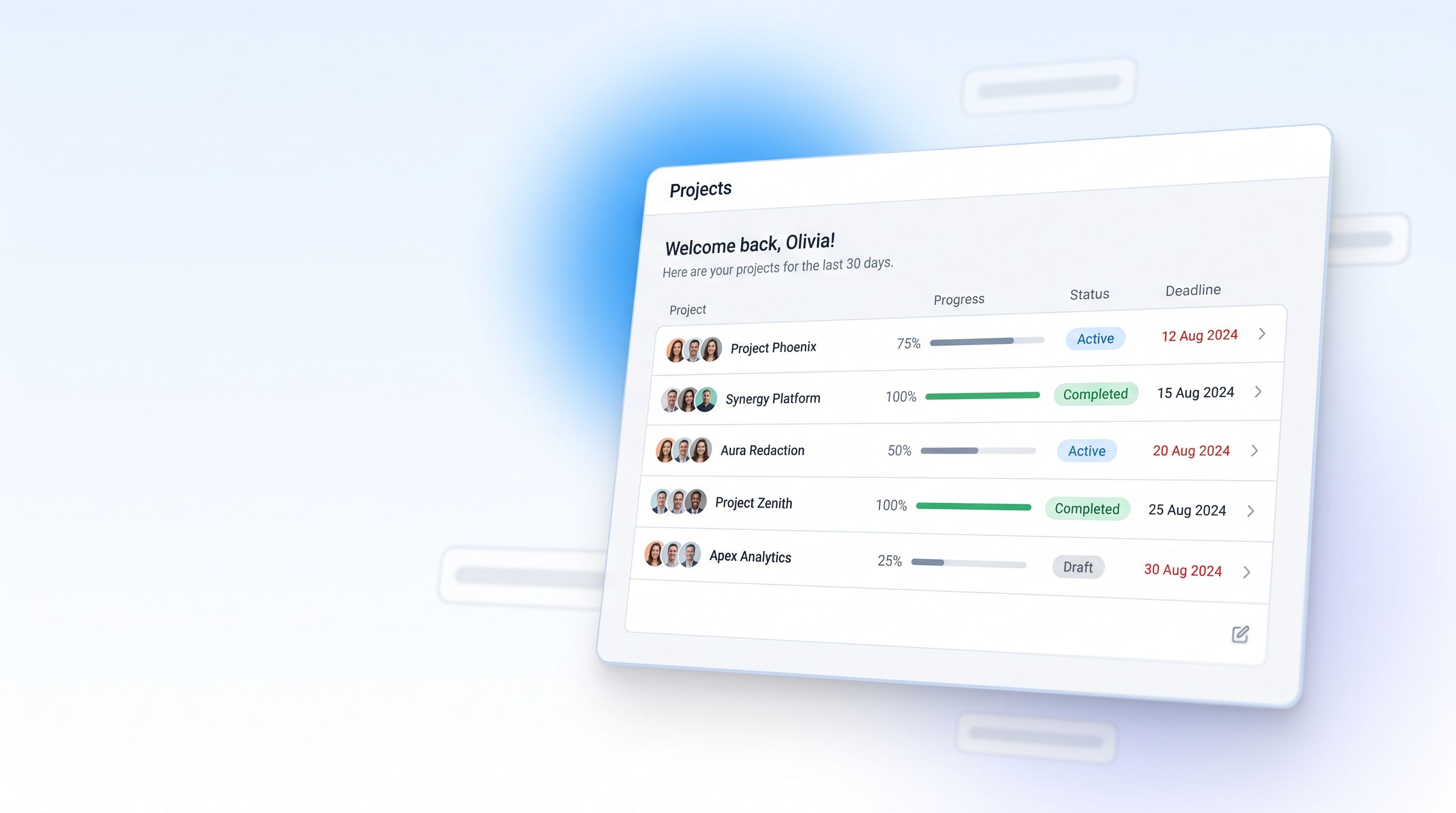
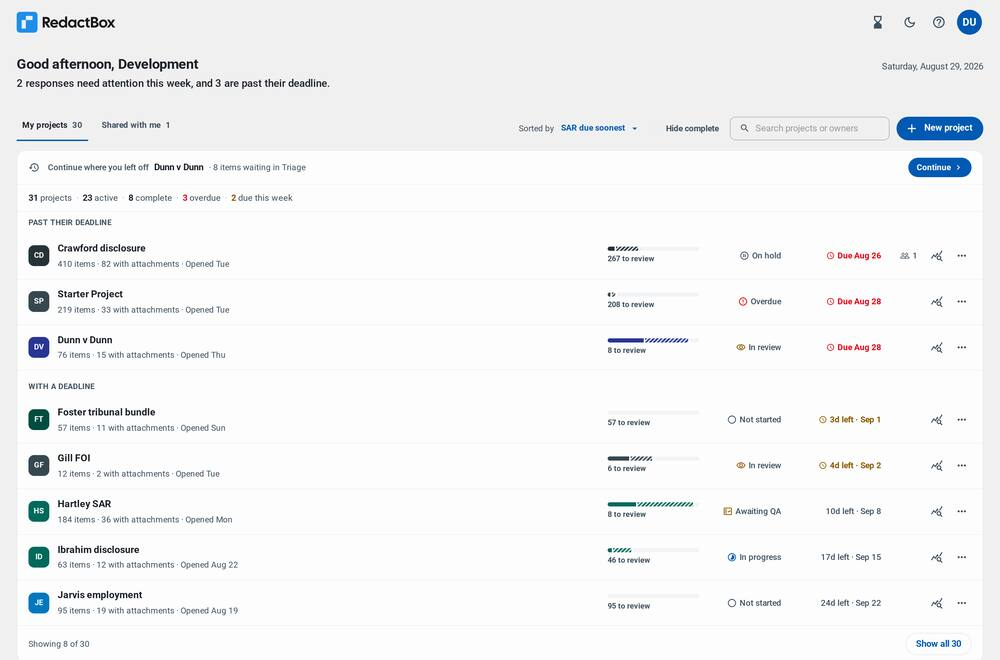
Open RedactBox and you now land on a dashboard rather than an empty console. Every project you own or have been given access to is on one screen, ordered by what is closest to its deadline, with enough of each project's state visible that you can decide where to start without opening anything.
Your projects, on one screen
The old project menu was a dropdown that told you names and nothing else. The new home screen is a list you can actually read.
Each project shows how many items it holds, how many carry attachments, how far through the review you are, what its status is and when it is due. Overdue work is grouped at the top under its own heading, so the thing that needs you today is the first thing you see.
Pick up where you left off — a resume bar at the top of the list takes you straight back to the project you were last working in, and says what is waiting there.
See the shape of the week — a line under the greeting names how many responses need attention and how many are past their deadline.
Sort, search and filter — order by deadline, name or recent activity; hide everything already complete; search by project or owner name once you have enough projects for it to matter.
Set a status yourself — Not started, In progress, In review, Awaiting QA, On hold and Complete are all settable from the row. Leave it alone and the status follows your progress, as before.
Set a deadline from the list — the SAR or FOI due date is editable in place, and the countdown on the row updates with it.
Detailed statistics, per project
Every row carries a statistics button. It opens a breakdown of that project on its own: how many items have redactions, how many were reviewed with nothing to redact, how many are still waiting, and how the redactions were applied — by hand, by area, automatically, or in bulk across the archive.
The same figures are summarised across every project at the bottom of the dashboard, over the last 30 days, the last 12 months, or all time.
Sharing, from the dashboard
Projects shared with you sit under their own tab, labelled with who owns them. Projects you have shared show how many people are on them, and that count is a button — it opens the sharing dialog directly, so access is managed from the same screen as the work.
An export and access trail
A Recent activity panel lists what has actually happened across your projects: exports taken, redaction logs generated, access granted, changed or removed, and scope changes. It is a record you can hand to someone who asks what happened and when.
Background tasks, wherever you are
Exports, conversions and bulk redactions carry on after you leave the screen that started them. The tasks tray is now in the dashboard header too, so you can see a job running in one project while you work in another — previously you had to be inside a project to learn that a different project had finished.
Improved
Project links
A project now has a real address that survives being bookmarked, shared and opened later. Following a link to a project you do not have access to now explains itself, names the account you are signed in as, and offers to sign you in with a different one, instead of dropping you on an empty screen.
Getting started
The first-run screen no longer hides the rest of the dashboard. If a colleague has shared a project with you and it has not appeared, the screen says where shared projects turn up and which address you are signed in as — the usual reason for an invitation that seems to have gone missing.
Fixed
Collaboration emails — invitations, access changes and ownership transfers — now come from RedactBox rather than the exports address, and replies reach a monitored inbox.
Deadlines are the same calendar day in every timezone; a date set late in the day no longer saved as the day before.
The whole of a project row is clickable, and the row says which project it will open.
Project names that are very long, written in another script, or empty no longer break the row or the screen-reader labels built from them.
The project list holds its shape at thirty projects, and "Show all" reveals the rest without the page jumping.
A project stays visible when a status change would have re-sorted it out of view.
The logo no longer shifts position when you move between the dashboard and a project.
Full guidance lives in our Knowledge Centre: https://help.redactbox.co.uk/en
As always, hit the feedback portal to tell us what is missing or what could be sharper: https://feedback.redactbox.co.uk/
August 19th, 2026
New
Improved
Fixed

New
This is a big one. The last ten weeks went on two things: finishing the review loop for people working through thousands of items in one sitting, and making the platform considerably harder to break. Here is what landed.
Mark an item as done — not just redacted
If you opened an item, read it properly and decided it needed no redactions, RedactBox counted it as unfinished. Forever. The Redact progress ring only counted items with a box drawn on them, so a careful reviewer doing exactly the right thing made the numbers look worse.
Completion is now a verdict you give, not a side effect of drawing a box. "I have looked at this and it is fine" is a real answer, and it counts.
Give a verdict and move on — mark an item complete and land straight on the next one.
Auto-advance after triage — a triage action moves you on automatically, so you can work through a list without reaching for the mouse.
Send something back from Redact — realised an item should never have been in scope? Un-triage it there and then, instead of hunting for it again in Triage.
Filter to what is left — show only the items still waiting on a verdict.
Redaction reasons, as codes
Reasons used to be free text, so every reviewer wrote them slightly differently and nothing could be grouped or reported on.
Now you pick an exemption from your own list — one click, or a keystroke — and it is stored as a code rather than a sentence. That turns the redaction log into an actual schedule: reasons group properly in the Schedule of Redactions, and there is a dedicated Reason column in the exported CSV. If a response is ever challenged, that log is your evidence.
You can still add a free-text note alongside the code. The Redactions Manager shows both, and editing a note no longer strips the code off the redaction.
Choose what is in scope — and change your mind
Not every project needs triage. Sometimes the whole set is in scope and you just want to get on and redact it.
You can now set that per project. Those projects carry an All in scope badge in the header so nobody is ever unclear which mode they are working in, and the setting can be changed afterwards — including pushing everything already uploaded straight through to Redact.
Uploads that survive real life
Pause and resume — stop a large upload and pick it up again.
Close the tab — come back later and carry on from where you were, rather than starting over.
Honest progress — the bar and the time estimate now reflect what is actually happening, including the processing that carries on after the transfer itself finishes.
Large PST imports resume — an import that stalls continues from where it stopped instead of going back to the beginning.
Teams
Bring colleagues in under a single subscription rather than everyone buying their own. You can appoint a manager to handle who is in the team, and anyone can leave a team they no longer need to be part of.
Annual billing and invoicing are both available — get in touch if either suits your organisation better than monthly card payments.
Sign in with a password, and turn on 2FA
Email and password sign-in now sits alongside the existing Google and Microsoft options, with optional two-factor authentication for accounts that want it.
Improved
Redaction accuracy
This matters more than anything else on this page, so it got the most attention.
Terms that wrap, split, or carry accents — a term broken across a line, interrupted by inline formatting (a stray bold tag mid-word), or written with accented characters is now found and covered properly. Previously a match could be highlighted in the viewer but missed on export, or the reverse.
Rotated pages — redactions land in the right place on pages that are not upright.
Exports fail loudly — if a redaction cannot be applied, the export stops and tells you why, instead of quietly producing a document with a gap in it. An error you can see beats a false negative you cannot.
No silent fallback — a secondary rendering path could drop area and image redactions under certain conditions. It has been removed outright rather than patched.
Nothing leaks through errors — when a document fails to process, the placeholder we generate no longer carries any of its content.
Exports
Mixing whole-file selections with individually picked items no longer silently drops the whole-file ones.
Exports are blocked while a bulk redaction is still running, so a half-finished document cannot leave.
Documents converted from Word no longer open on a blank first page.
Exported PDFs are titled with the filename, and no longer carry the item's subject line in their file metadata.
Staying signed in
A cluster of spurious "Session Expired" messages, sign-in loops and mid-session logouts are gone. A long upload no longer signs you out part-way through, browser back and forward work properly between projects, and a link you followed before signing in now takes you where you meant to go rather than dropping you on the dashboard.
Deleting means deleted
Deleting a file now removes the original upload and any extracted attachments from storage, not just the database records. Deleting a project removes its documents too. Deletion is also far quicker, and no longer intermittently errors before eventually working.
Fixes
Keyboard shortcuts for triage work across a multi-item selection, with undo and a consistent set of toasts.
Search finds items in a newly imported project straight away — new projects could previously return nothing at all.
Word list counts read the same on every screen: the term row, the button and the confirmation all speak in the same units.
Deleting a single term from a word list no longer shifts your selection onto the wrong terms.
PST imports from Exchange and Purview show the real sender rather than the system account.
A partial import says so honestly, instead of reporting that nothing is missing.
Bulk selection in Triage acts on what you can see, not on a stale ordering.
The page indicator and navigation in the PDF viewer stay in step while scrolling long documents.
A document that fails to render shows a clear error instead of an empty pane.
Settings changes stick, rather than reverting a moment later.
The redaction toolbar is fully usable with a keyboard and a screen reader.
Files rejected on drag-and-drop now tell you which ones, and why.
Double-clicking to create a project no longer creates two.
Links inside an item body open in a new tab.
Several of the items above came straight off the feedback board — thank you to everyone who logged them.
Full guidance lives in our Knowledge Centre: https://help.redactbox.co.uk/en
As always, hit the feedback portal to tell us what is missing or what could be sharper: https://feedback.redactbox.co.uk/
June 9th, 2026
New

New
RedactBox is no longer a solo tool. You can now invite colleagues into a project, work through it together in real time, and hand a project over when someone else needs to take the lead. Whether you're splitting a large SAR across a team or just want a second pair of eyes before export, collaboration is here.
What you can now do
Invite by email — add a colleague to any project and choose their access level when you do.
Viewer access — free — anyone with a RedactBox account can be added as a Viewer to review a project read-only, at no cost.
Editor access — give a colleague full hands-on access to redact, triage, upload, and export alongside you. Editors need their own Professional subscription.
See who's in the room, live — presence indicators show who else is in a project and exactly which item each person has open, updating in real time as you work.
Transfer ownership — hand a project over to a colleague whenever you need to.
Where to find it
Open any project and click Share to invite people and set their access. Sharing is a Professional capability — the project owner needs a Professional plan to invite collaborators.
Full details, including how access levels work and what each role can do, are in our Knowledge Centre: Sharing projects and collaborating
As always, hit the feedback portal to tell us what's missing or what could be sharper: https://feedback.redactbox.co.uk/
May 18th, 2026
New
Improved
Fixed
New
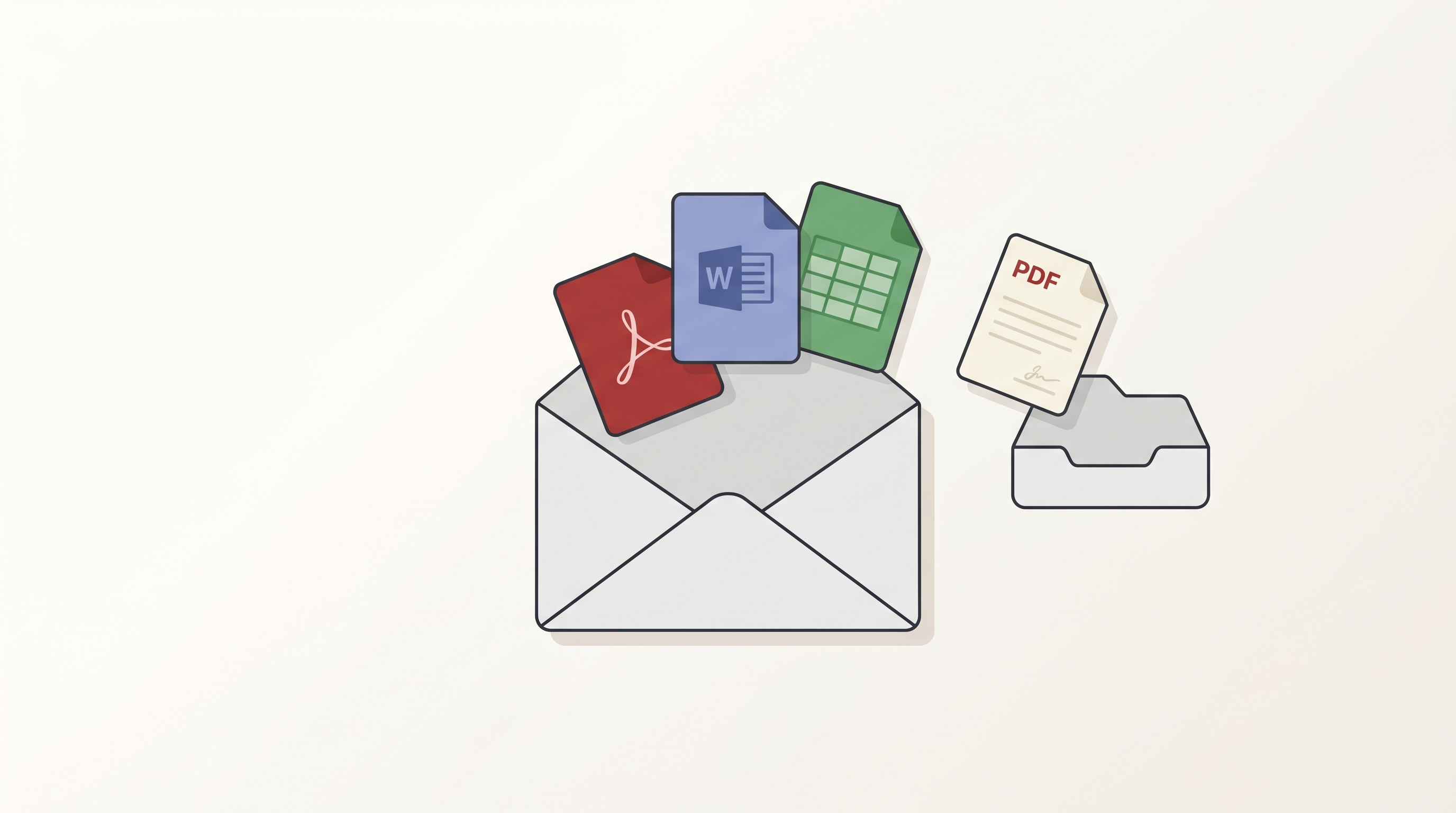
Until now, attachments inside emails were invisible to RedactBox. You could see that an email had a PDF or a Word doc bolted on, but you couldn't open it, read it, or redact it without leaving the platform. That changes today. Every supported attachment is now first-class: preview it in-app or download it. PDF attachments can also be imported into your project as a document and redacted alongside everything else — more document types are on the way.
A dedicated Attachments tab
Open any email and you'll find an Attachments tab next to Body and Headers. Files appear in a left-rail list with their type and size. Pick a file and the right pane previews it instantly.
- PDFs
- Images — JPG, PNG, GIF, WebP, BMP
- Word documents — .docx, with formatting and tables intact
- Spreadsheets — .xlsx and .xls, with each sheet accessible from a tab strip
- Plain text and code — .txt, .md, .log, .json, .xml, .csv
- Inline images — the small images embedded inside an email body, surfaced in their own expander
For file types we can't safely render in the browser, the preview pane shows a clear "No preview" message with a download button.
Download
Every attachment has a Download button in both the rail and the preview header. The button shows clear feedback as it works — Download → Downloading → Downloaded — so you can see at a glance that your click did something.
Attachments over 50 MB aren't available to download — if you see a Too large badge, ask the sender to share the file through a transfer service instead.
Import a PDF as a project document
Some PDF attachments need redacting in their own right — a contract, a statement, a report. Open any PDF attachment and you'll see an Add to project split-button next to Download:
- Add & keep — imports the PDF and marks it as Kept, so it shows up in Redact mode straight away
- Add untriaged — imports it without marking it Kept, so you can handle it in Triage mode later
Imported PDFs carry a link back to the email they came from, so you can always trace where a document originated. From there they behave like any other document — same search and redact tools, same export pipeline.
This is PDF-only to start with. Over the coming releases we'll extend it to other known document types — Word documents, spreadsheets, presentations — converted into PDFs on the way in and imported into your project automatically, so you can redact the underlying content the same way you would any other document.
Smoother PDF viewer for big documents
The PDF viewer now handles very large documents — hundreds of pages — without slowing down or stuttering as you scroll.
Exports — faster, clearer, and far more reliable
If you've ever kicked off a big export and wondered whether it was actually doing anything, this one's for you. We've reworked the export pipeline end-to-end so large jobs finish reliably and you can see exactly where they are at every stage.
- ZIP packaging is now visible — the Tasks panel now shows the packaging and download-prep phases, not just the redact phase. No more "stuck at 100%" mystery.
- Accurate progress counts — the "X of Y" counter no longer drifts out of sync across multi-batch exports. It reflects what's actually been processed.
- Large exports complete reliably — exports of huge mailboxes used to occasionally stall during ZIP assembly. They now upload in resumable chunks and finish cleanly.
- Retry stuck exports — on the rare occasion an export gets stuck, a Retry button appears in the Tasks panel so you can re-run it yourself instead of waiting for support.
- Tell your exports apart — when you have multiple exports running, each one now shows its project name and a unique label so you can see which is which at a glance.
- Tidier Tasks panel — friendlier progress UI, no duplicate spinners, clearer status text.
Also in this release
A handful of other improvements and fixes have rolled out alongside the attachments work:
- Word list manager, redesigned — cleaner layout, easier to scan, and shared word lists now refresh across every project the moment you edit them.
- Faster import for large mailboxes — mbox and EML files parse significantly faster, especially on emails with very long bodies.
- UK date format by default — email header dates in generated PDFs now render as DD/MM/YYYY with 24-hour time.
- More reliable imports — interrupted or stuck imports recover cleanly. If a parse fails mid-flight, another worker picks it up automatically rather than leaving the file in limbo.
Improved
- Auto-Redact in this item now behaves consistently with Auto-Redact across all items — same match counts, same controls, same undo, whichever scope you pick.
- Cleaner confirmation when removing an auto-redaction — for redactions applied to a single item, you now get a clear single-button Remove instead of an unnecessary "Remove from this item / all items" prompt.
- Bulk-redaction progress shows Searching page X of Y while it scans and Redacting N of M occurrences while it applies, so you can see exactly where it is.
- BETA tag removed from Auto-Redact dialogs.
Fixes
- Multi-word redactions are now applied consistently on export — a specific combination of conditions could previously cause them to be missed.
- Multi-word redaction rectangles now land precisely on the matched text, including across line wraps.
- Phantom duplicate emails no longer appear when the mbox parser hits a particular race condition on very large files.
- Project document counts update immediately when files are deleted, instead of needing a refresh.
- Project documents appear in the sidebar straight after importing a PDF, with no page refresh needed.
- The PDF viewer no longer occasionally throws a "detached buffer" error when switching previews quickly.
- Background platform hardening — stricter ownership checks across project, file, and attachment routes, and tighter rate limiting on Cloud Run. You won't see this, but it keeps your data where it belongs.
As always, please give us feedback here if you'd like to suggest features or flag bugs. Plenty more on the way.
May 11th, 2026
New
Improved
Fixed
New
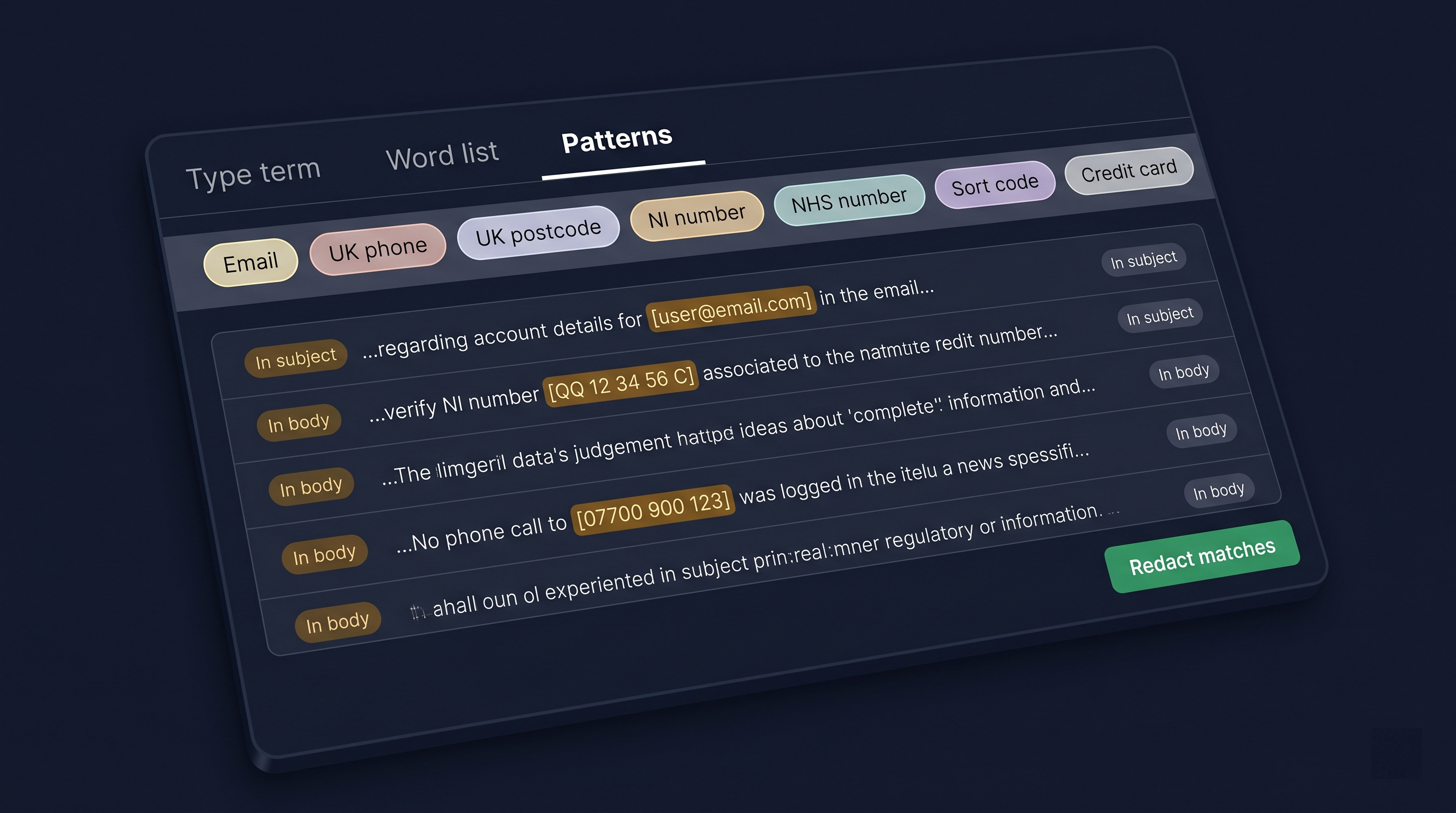
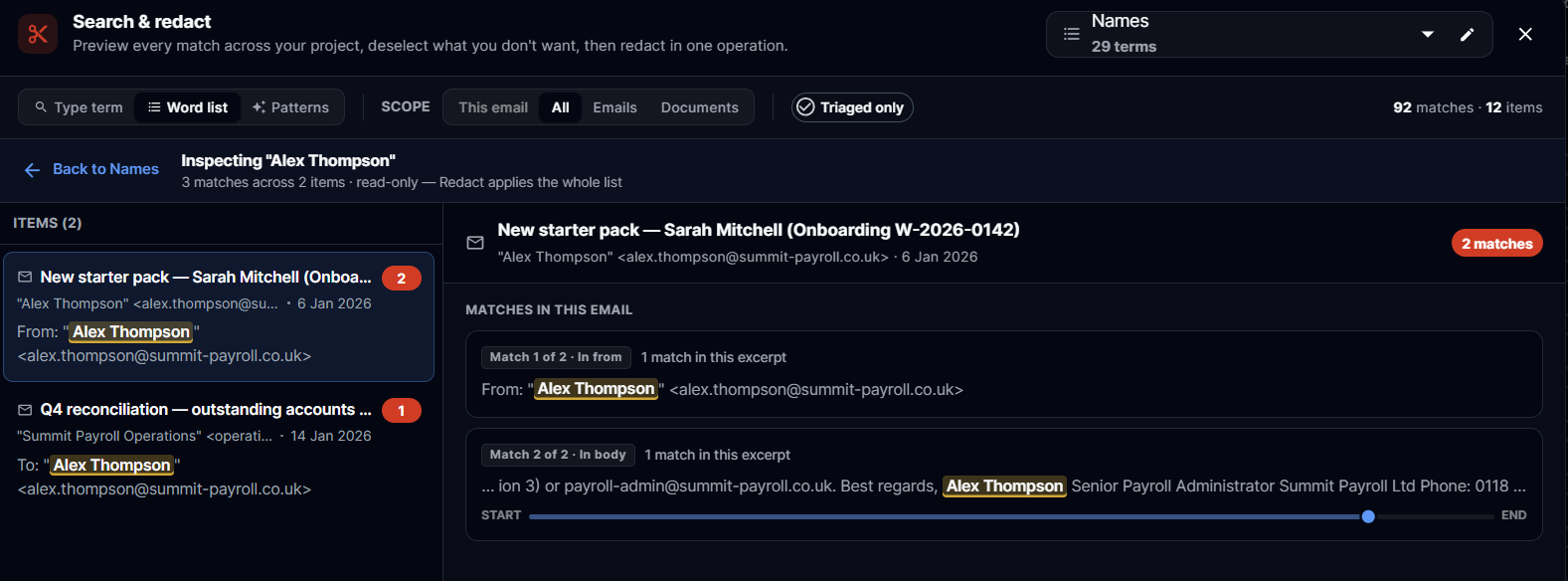
Search & Redact is the most-used tool in RedactBox, so we've spent the last few weeks taking it apart and putting it back together. The result is a faster, more honest workspace for working through matches, plus a new Patterns mode that handles the most common PII categories with a single click.
A new two-pane workspace
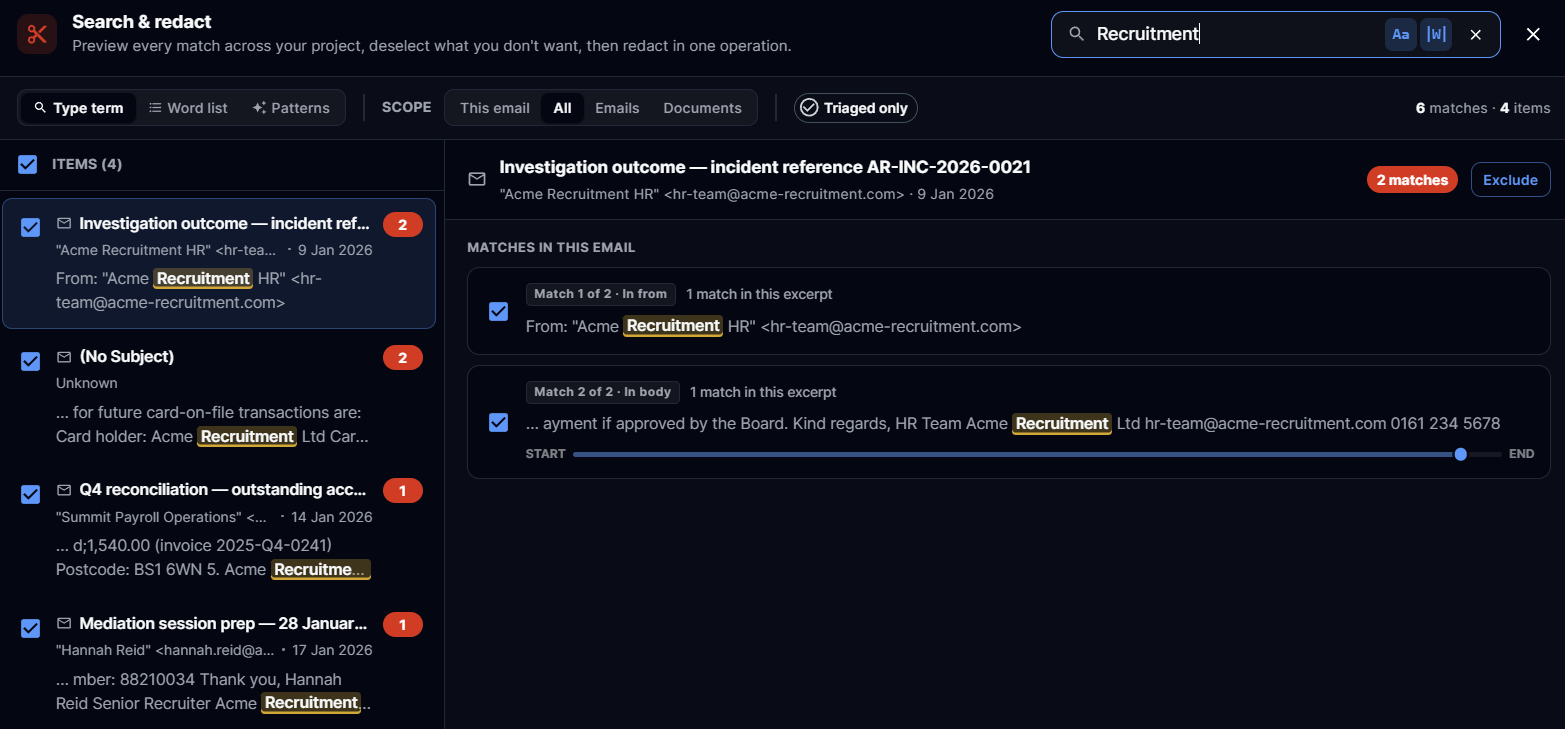
The dialogue now splits into a result list on the left and a full match preview on the right. Click any row and the preview fills instantly with the snippets you already had on the row, then the rest of the matches stream in behind it — no more waiting on a blank pane.
Match N of M · In subject / body / from / to — every snippet now tells you which field it came from, so you know at a glance whether a hit is in the subject line, the body, or a recipient
Position scrubber — a small bar under each snippet shows roughly where in the document the match falls (Start ──●── End). Hover for a tooltip like "42% through — in the first half"
Cascading entry — new matches fade in subtly rather than appearing all at once
Recent searches — the recent-search chips actually work now. Your last queries are recorded and one-click re-runnable
Shift+click multi-select — pick a range of rows in one go to include or exclude in bulk
Skip individual matches — uncheck any snippet card to leave that single match alone; the count drops by one for that item, the rest still go through
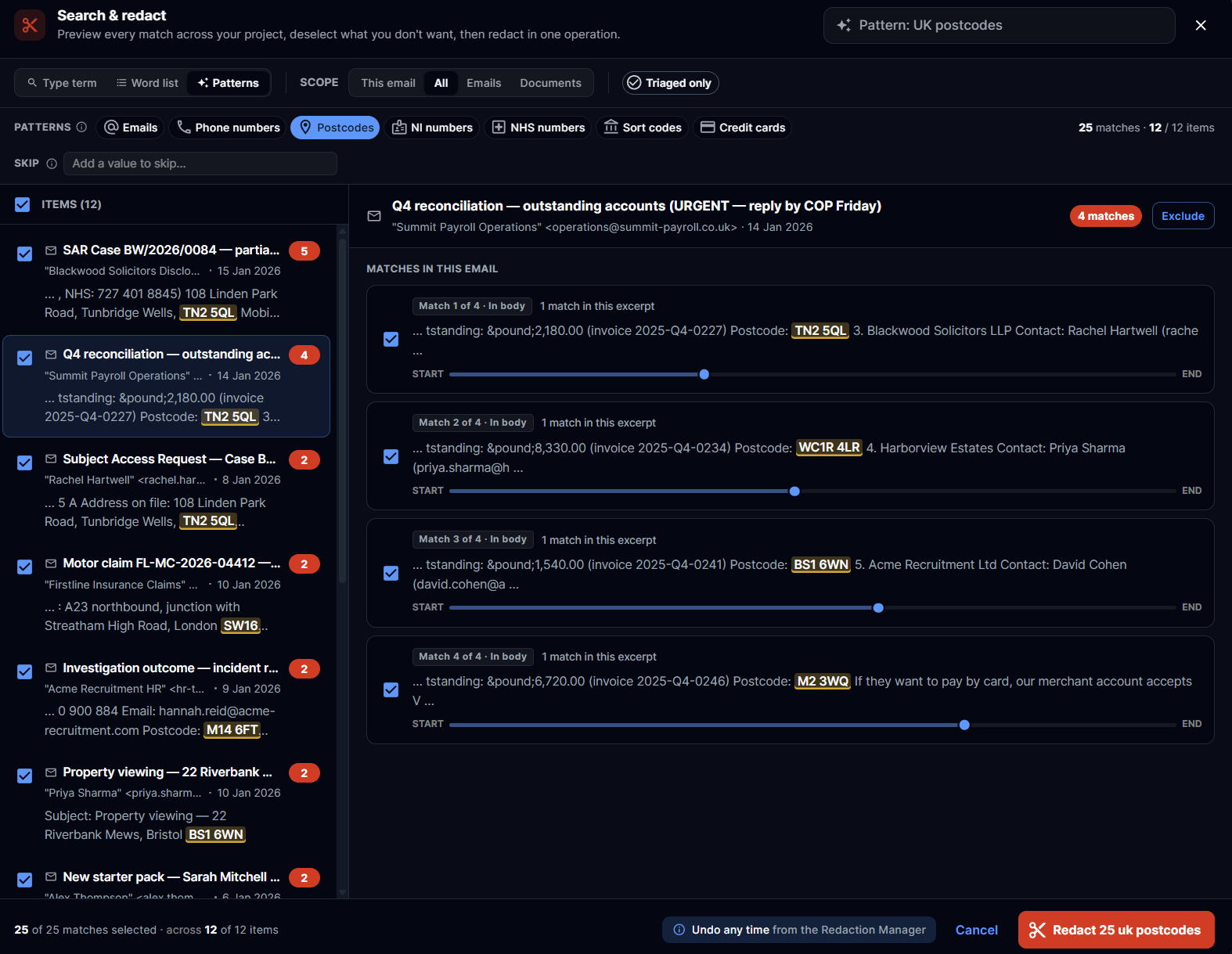
Skip a value across the whole project — in Patterns mode, click any highlighted match in a snippet to skip every other instance of that exact value too. Perfect for whitelisting your own company domain when running an Email-addresses sweep, or excluding a known internal phone number
Common Patterns — one click for the usual suspects
A new Patterns tab sits next to Type term and Word list. Pick a chip, and we run a project-wide search for that pattern. You review the matches and redact in one go. The same skip controls apply — uncheck individual snippets, exclude whole items, or click any highlighted match to skip every instance of that exact value project-wide.
Email addresses
UK phone numbers
UK postcodes
National Insurance numbers
NHS numbers
Sort codes
Credit card numbers (Luhn-validated to cut false positives)
A note on accuracy: these are heuristic searches. Credit cards are validated, but the others can produce false positives, so always review before redacting. We picked categories where a quick scan beats hunting term-by-term.
Per-term match flags on word lists
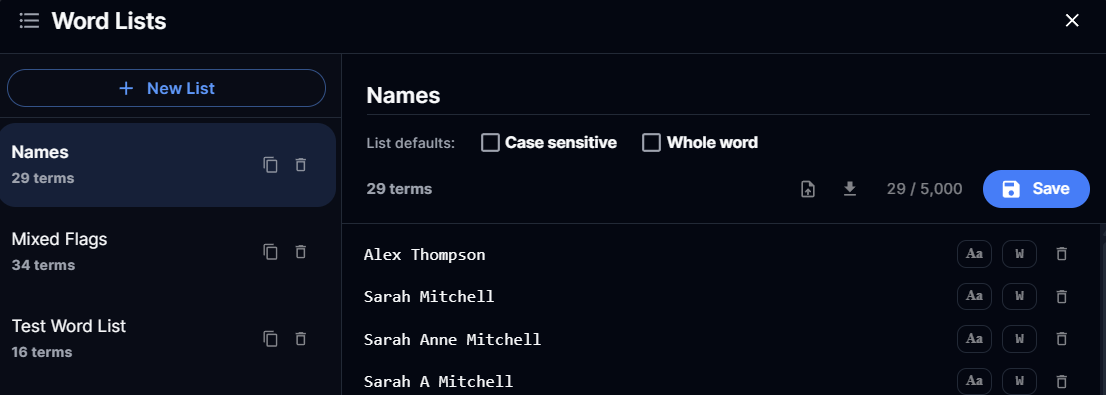
Word lists no longer treat every term the same. Each term in a list can now carry its own case-sensitive and whole-word flags. Add "Smith" as case-sensitive, and it won't redact "smith" or "blacksmith"; add an email domain as case-insensitive in the same list. The list also has its own defaults, so you don't have to set them per term.
Word-list drill-in
Click any term inside a word list, and you now drop into a read-only inspector scoped to just that term — same snippet layout, same field labels, same position bar. Useful when you want to sanity-check what a single entry is matching across a project before you commit to redacting it.
Project palette and Manage Projects
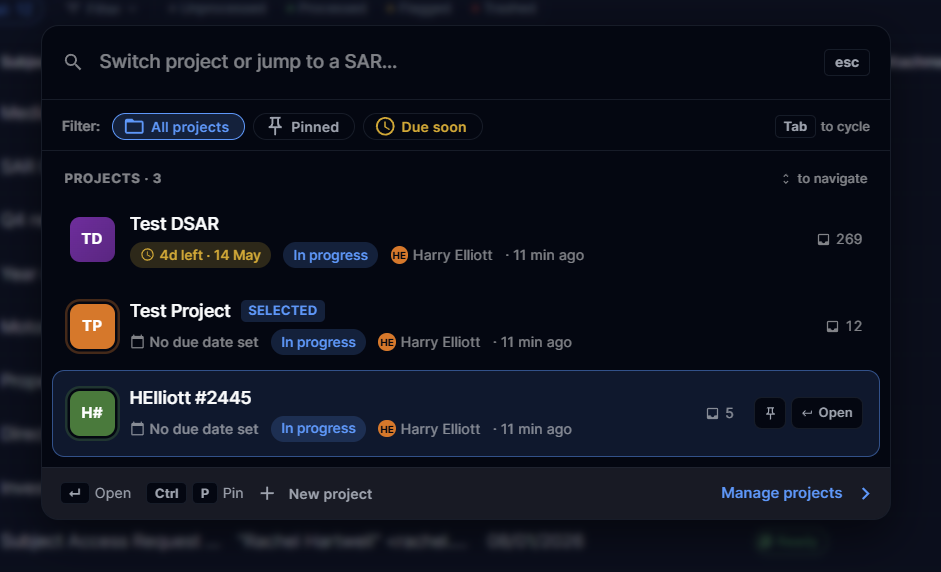
The old project dropdown has been replaced with a project palette (Ctrl/Cmd + K from anywhere in the console). Type a few characters to jump straight to a project or SAR — no more scrolling through a long menu.
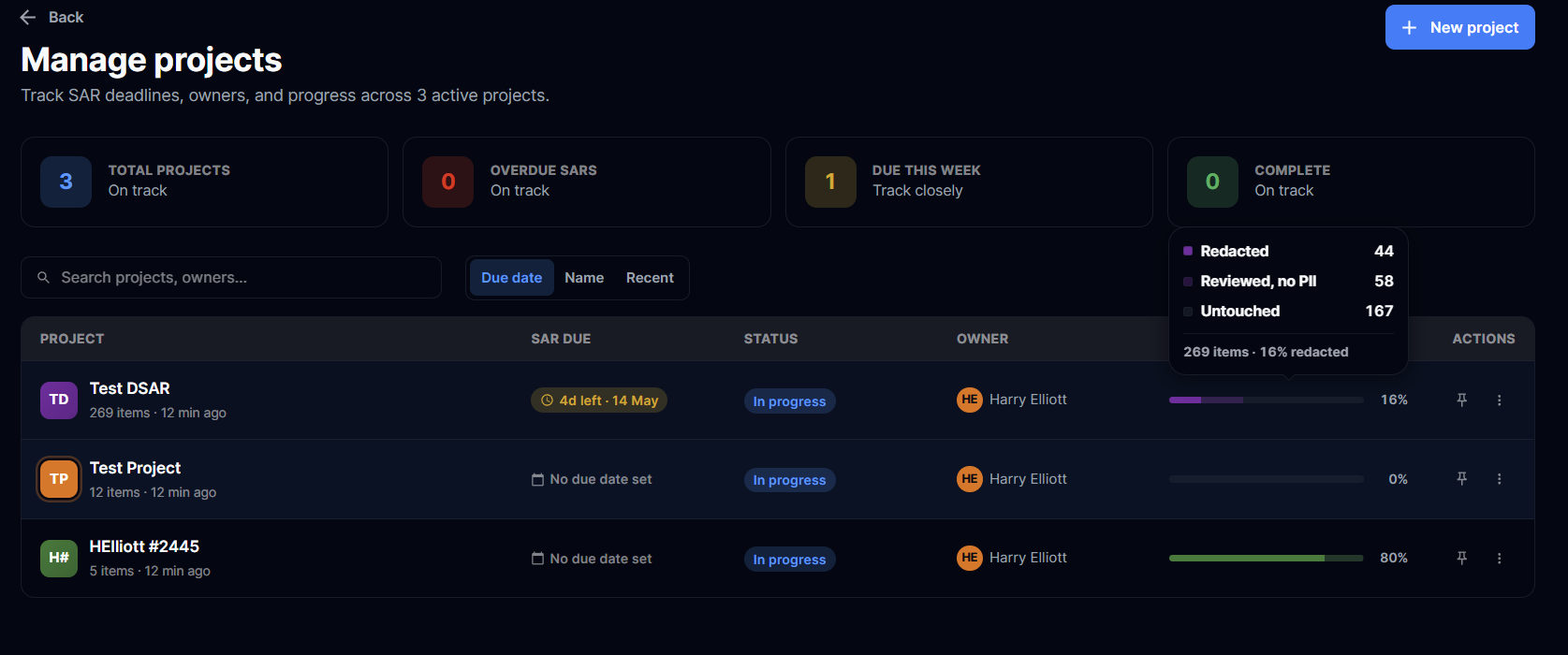
Alongside it, a new Manage Projects page shows every project as a card with a three-segment progress heatmap (triaged, redacted, approved). Open it from the palette, and you can see at a glance which projects need attention.
Responsive sizing
The Search & Redact dialogue now scales with the viewport. Bigger monitors show more matches without scrolling (up to 1500 × 1300px); smaller screens still get a usable layout. No more cramped result lists on a 27" display.
Improved
Snippet rendering is significantly faster on large result sets — no more freeze on the loading bar when a search returns thousands of hits
Smoother pattern progress — the bulk progress bar updates in real time as pages are scanned, rather than jumping from 0% to 100% at the end
Field-source labels replace "Page N" — we'd been trialling per-page PDF text extraction to tell you which page a match was on. It turned out to be too costly and fragile for what it gave you back, so we pulled it. The new "Match N of M · In <field>" plus position bar tells you where a match is in a more useful way, with none of the extraction overhead
Faster Manage Projects load on accounts with lots of projects — counts now come back in a single query instead of one per project
Truncation warnings — if a pattern search hits the 200,000-match safety cap, we now warn you so you can narrow the scope and re-run rather than silently miss the remainder
Fixes
Pattern redactions no longer appear as solid red bars in the single-email preview — they render as the same purple overlay as word-list matches, and are only applied at export
Word-list bulks now honour each term's case-sensitive and whole-word flags at export time
Cross-project guard on word-list bulk redact — running a list against the wrong project is now blocked
Recent-search chips populate correctly from the last few searches in your session
All of the information above is also available in our Knowledge Centre!
https://help.redactbox.co.uk/en
As always, hit the feedback portal to tell us what's missing or what could be sharper.
April 29th, 2026
New
Fixed

New
One of the most-requested features since launch: proper duplicate detection across files. When you upload a Sent folder and an Inbox, or two overlapping date-range exports, the same email typically appears in more than one file. RedactBox now automatically finds those copies using each email's Message-ID header and provides a wizard to review and remove them — without touching the copy you want to keep.
How you'll know
When duplicates exist in a project, a banner appears above the email list summarising how many items are affected. Counts grow live as each file finishes parsing, so you don't have to wait for every PDF to generate before seeing the first number.
Banner — live count of items with copies, with a Review duplicates button

Inline chips — every affected email row shows an Original or Duplicates chip so you can see at a glance which copies are keepers
Filter — turn on Needs duplicate review in the filter panel to narrow the list to unresolved groups
The Manage Duplicates wizard
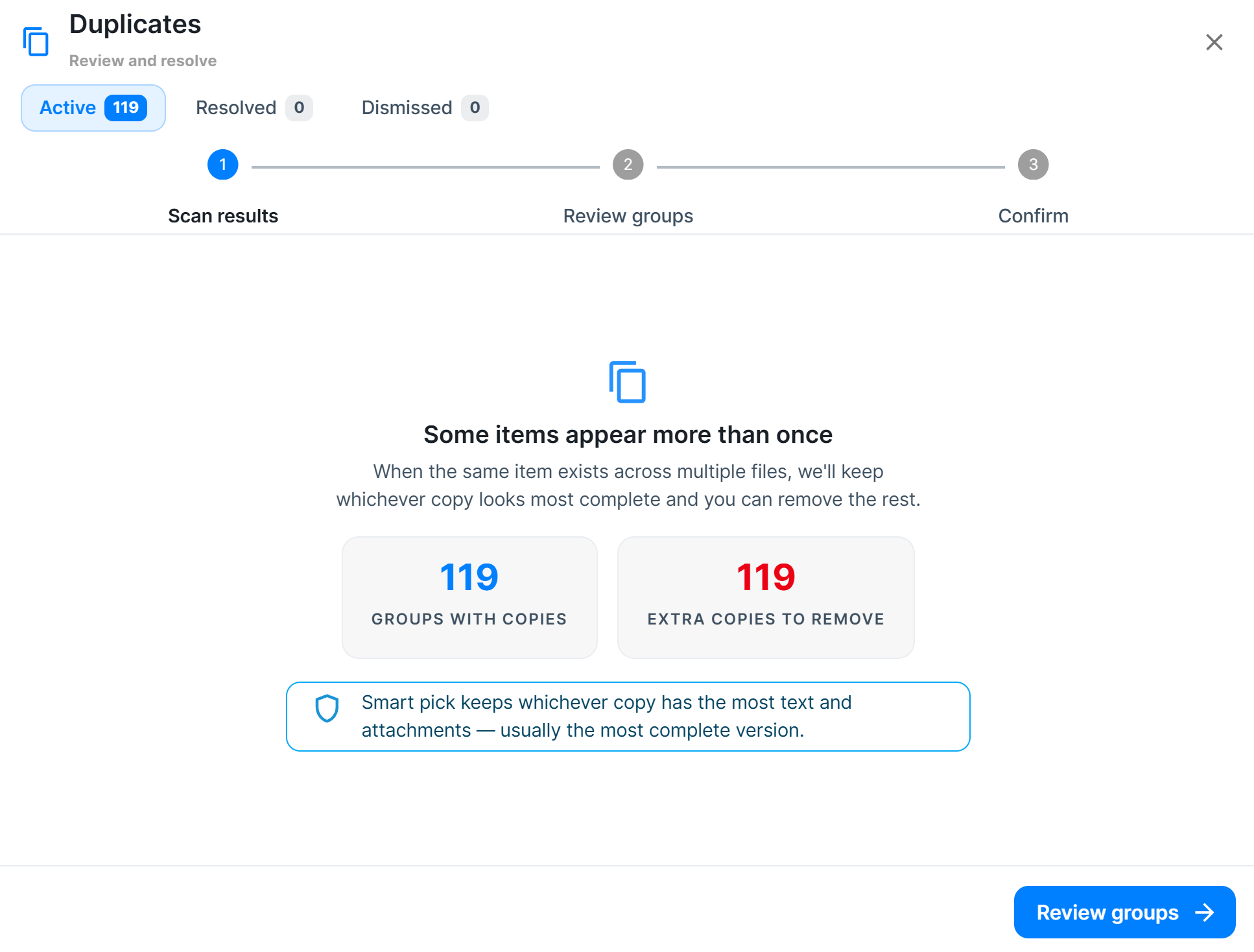
Open it from the banner or Tools → Manage Duplicates. Three tabs cover every state of a group:
Active — a three-step wizard: scan results, review the groups, confirm
Resolved — everything you've already handled, with a per-row Undo
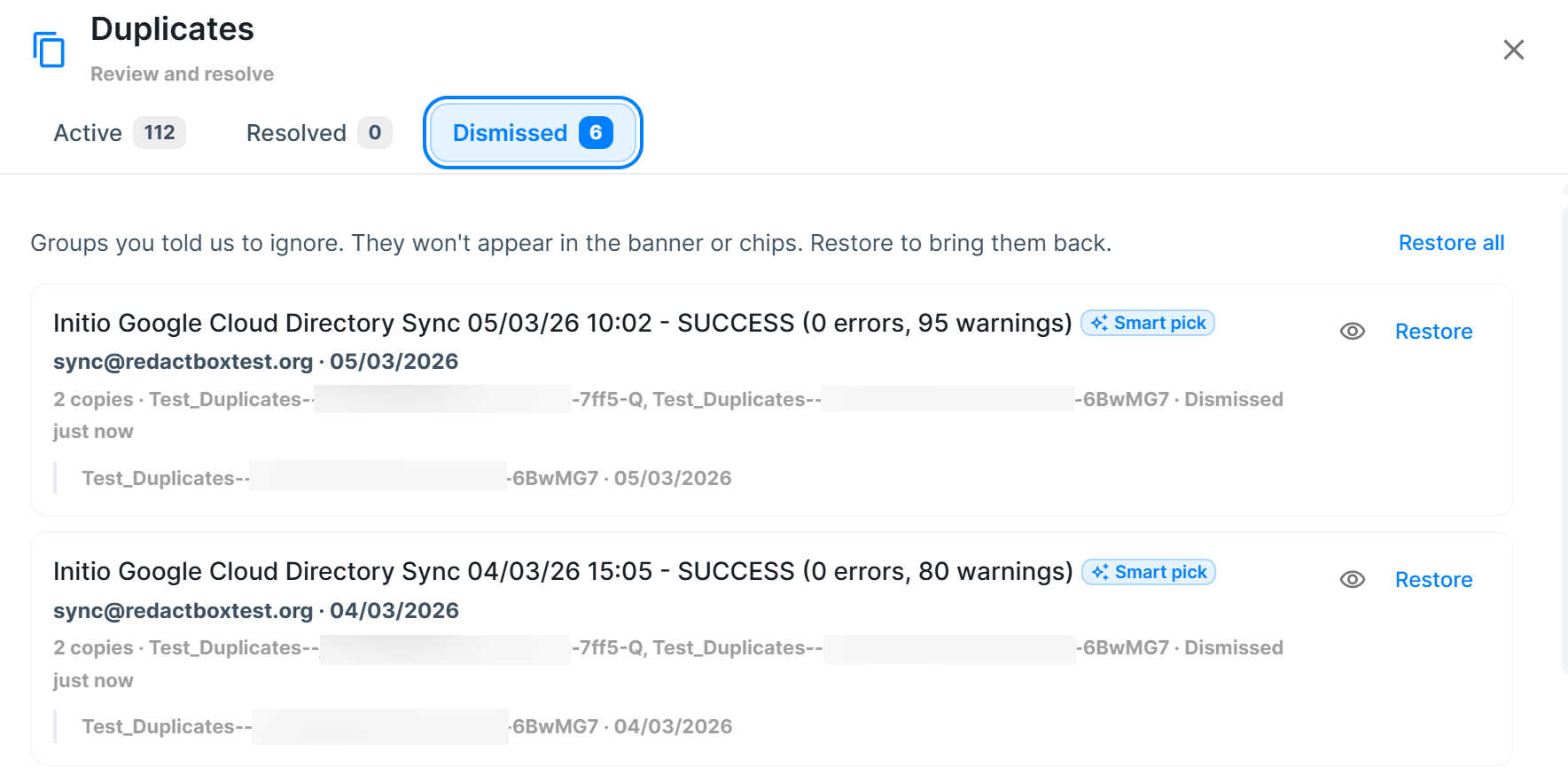
Dismissed — groups you chose to ignore, with a Restore action
Inside the Review step, you can:
Resolve a single group from its inline Resolve button
Select multiple groups and resolve them together
Preview any email inline before making the call
Dismiss a group you don't want to act on now
Undo all with an inline two-click confirm
Quick-resolve chip
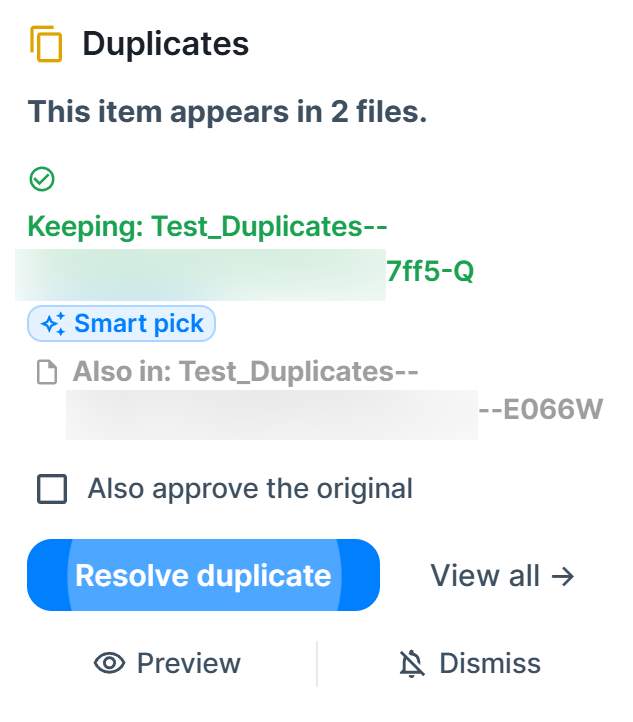
You don't have to open the full wizard for every group. Click the yellow Duplicates chip beside an email, and a popover shows which file is being kept, why (Smart pick, Newest, or Oldest badge), and a Resolve duplicate button. Tick Also approve the original if you want the kept copy marked Processed in one go.
Smart pick, Newest, Oldest
A new Duplicates section in Settings lets you choose how RedactBox picks which copy to keep:
Smart pick (recommended) — keeps whichever copy has the most text and attachments. Usually, the most complete version, since emails lose content as they're forwarded or quoted.
Keep newest — always keeps the most recent copy
Keep oldest — always keeps the earliest copy. Useful for compliance workflows where the original send date matters.
Changing keep mode immediately re-assigns the Original across every unresolved group. Already-resolved groups are left alone.

Auto-approve the kept original
A second setting controls what happens to the copy you keep. Off by default — the kept copy stays in its current state, and you approve it yourself. On — it's marked Processed automatically the moment you resolve the group. Per-action override from the popover is always available.
Re-emerged groups
If you dismiss a group and later upload a file containing another copy of the same email, RedactBox flags the group as re-emerged on the Active tab so it comes back to your attention. No manual restore needed.
Export integration
Duplicates you trashed during review are automatically excluded from every export — ZIP, PDF, bulk. Only the copy you kept appears in the output. Dismissed groups have no effect on exports; all copies stay in.
Also in this release
Exports rebuilt for bigger projects — large projects no longer time out or stall:
Filter before you export — pick only the emails that match your current filter
Branded summary PDF included in every export ZIP
The progress bar only appears for exports of 200+ emails; smaller exports just finish
Cancel actually cancels — no ghost completions in the background
Other improvements
Uploads up to 3 GB now work end-to-end
PST files no longer crash during import
Exclude / negation operators in email filters (does not contain, is not, does not equal)
Bigger caps on word lists and bulk redaction payloads
Auto-redact → All Emails is out of beta — BETA tag removed
Fixes
Word list redaction shows correct aggregate counts with proper progress and working undo
Stripe subscription upgrades and downgrades handle more edge cases cleanly
Quick filters in Triage no longer flash through stale data when switching files
The "file processed" toast no longer fires on files already processed before you opened the app
All of the information above is also available in our Knowledge Centre!
https://help.redactbox.co.uk/en
As always, hit the feedback portal to tell us what's missing or what could be sharper.
March 31st, 2026
New
Improved
Fixed
Word Lists
Create reusable lists of terms for bulk search and redaction. Paste comma-separated values or upload a CSV — terms are automatically split and deduplicated. Save lists per project and apply them in Search & Redact with one click.
Create, edit, duplicate, and delete word lists from the Tools > Word Lists manager
Paste comma-separated or newline-separated terms — automatically parsed on paste
Import terms from CSV or TXT files
Export lists as TXT for sharing across projects
Apply a word list in Search & Redact to search all terms at once across every file
Bulk redact all matches from a word list in a single action
When to use it: You have a list of names, email addresses, or phrases that need to be redacted across a large case. Instead of searching one term at a time, paste your list and redact everything in one pass.
Redactions Manager
A new tool for viewing, searching, and removing redactions across your entire project. Open it from Tools > Redactions.
Grouped view (default): redactions collapsed by word — see how many times each term was redacted and across how many files
Individual view: every redaction as its own row with date, item, and comment
Click any row to expand and see which items were affected
Edit comments inline — click a comment cell to open a popover editor. Group comments update all redactions of that word at once
Click long text to expand it in place, with a copy button for easy extraction
Sort by any column, search across all redaction text, and paginate through large datasets
Remove individual redactions or undo an entire group with one click
Multi-File Selection
Select multiple files in the sidebar to view all their items in a single list. Hold Ctrl (or Cmd on Mac) and click to toggle individual files, or
Shift+Click to select a range. A subtle visual hint appears when hovering with modifier keys held, so you know multi-select is active.
The file count chip now shows "2 of 5 selected" and doubles as a Select All / Deselect toggle — click it to select every visible file in one go.
All existing workflows — triage, redaction, bulk actions, select all pages, and export — work seamlessly across multi-file selections.
PDF Viewer Fullscreen
A new full-screen button in the PDF viewer header expands the viewer to fill the entire panel, hiding the email list. Arrow keys navigate between items while in
full-screen. Clicking a file or closing the viewer automatically exits full-screen.
Improved
Faster, Smoother Interface
We've rebuilt the data layer under the hood. Mode switching, pagination, sorting, and filtering are now significantly faster with no loading flash between transitions — previous data stays visible while fresh data loads in the background.
Redaction counts now load in a single request instead of one per item, and triage actions show instant feedback before the server confirms.
Smarter Loading States
Loading indicators only appear when they're useful — a thin progress bar shows during background refreshes, but cached data stays visible throughout. No more blank
screens or flickering stats when switching modes.
Quick Filters
Quick filter chips in Triage mode now respond instantly. Switching files properly clears the active filter, and triaging an item immediately updates filtered views so you don't need to refresh.
Fixed
Bulk redaction progress bar now updates in real time
Redaction counts refresh across all visible items when adding or removing redactions
Sidebar stats no longer flash incorrect values when switching modes
Uploading a file no longer auto-selects it while still processing
Project reset fully clears the interface without needing a page refresh
Filter chip text alignment corrected in dark mode
Switching projects no longer shows a stale "Failed to load emails" error
Quick filters no longer carry over when switching files
PDF conversion toast no longer fires on already-completed files
As always, please give us feedback here if you would like to suggest features for us to work on, as well as report any bugs you may find with the application.
March 4th, 2026
New
New: Area-Based Redaction
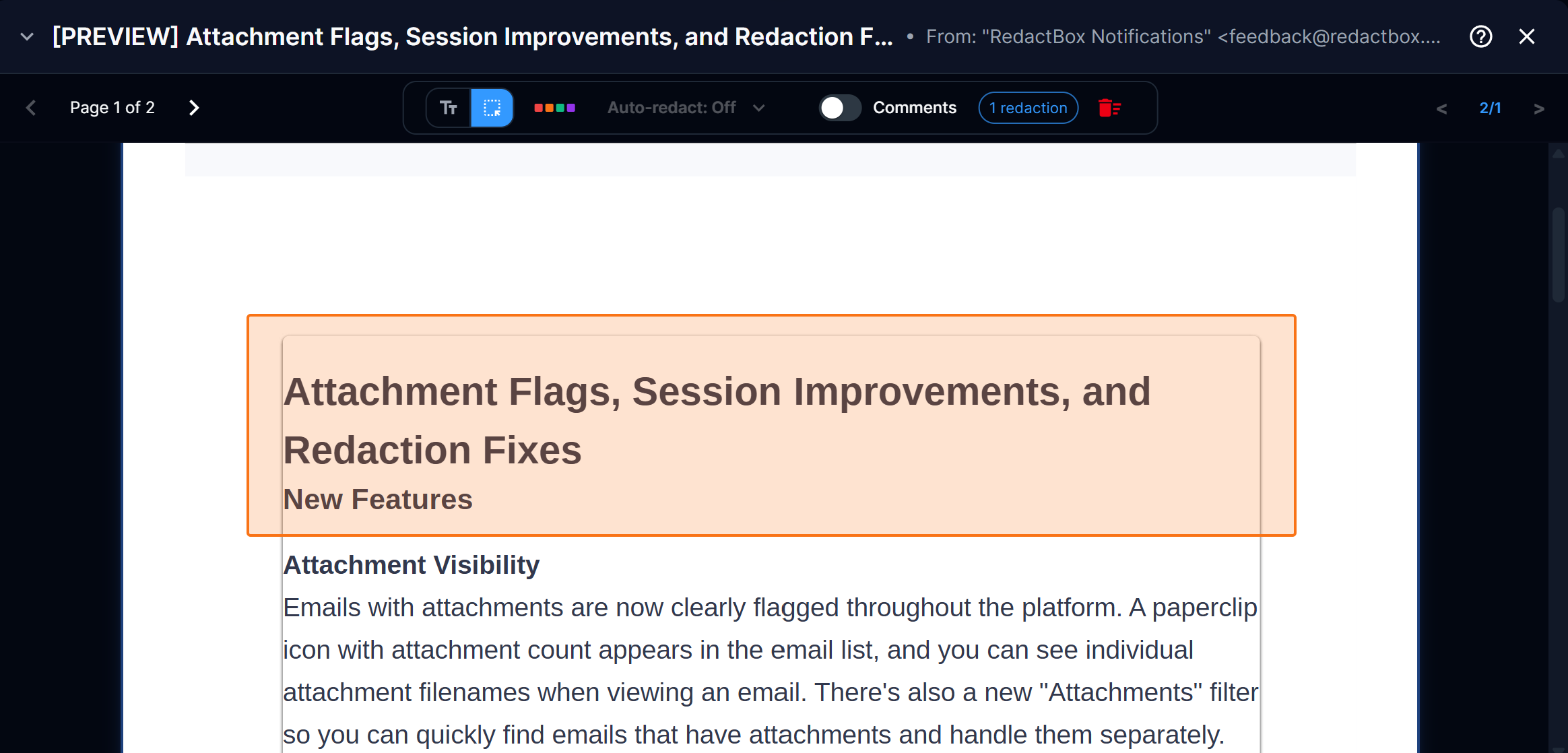
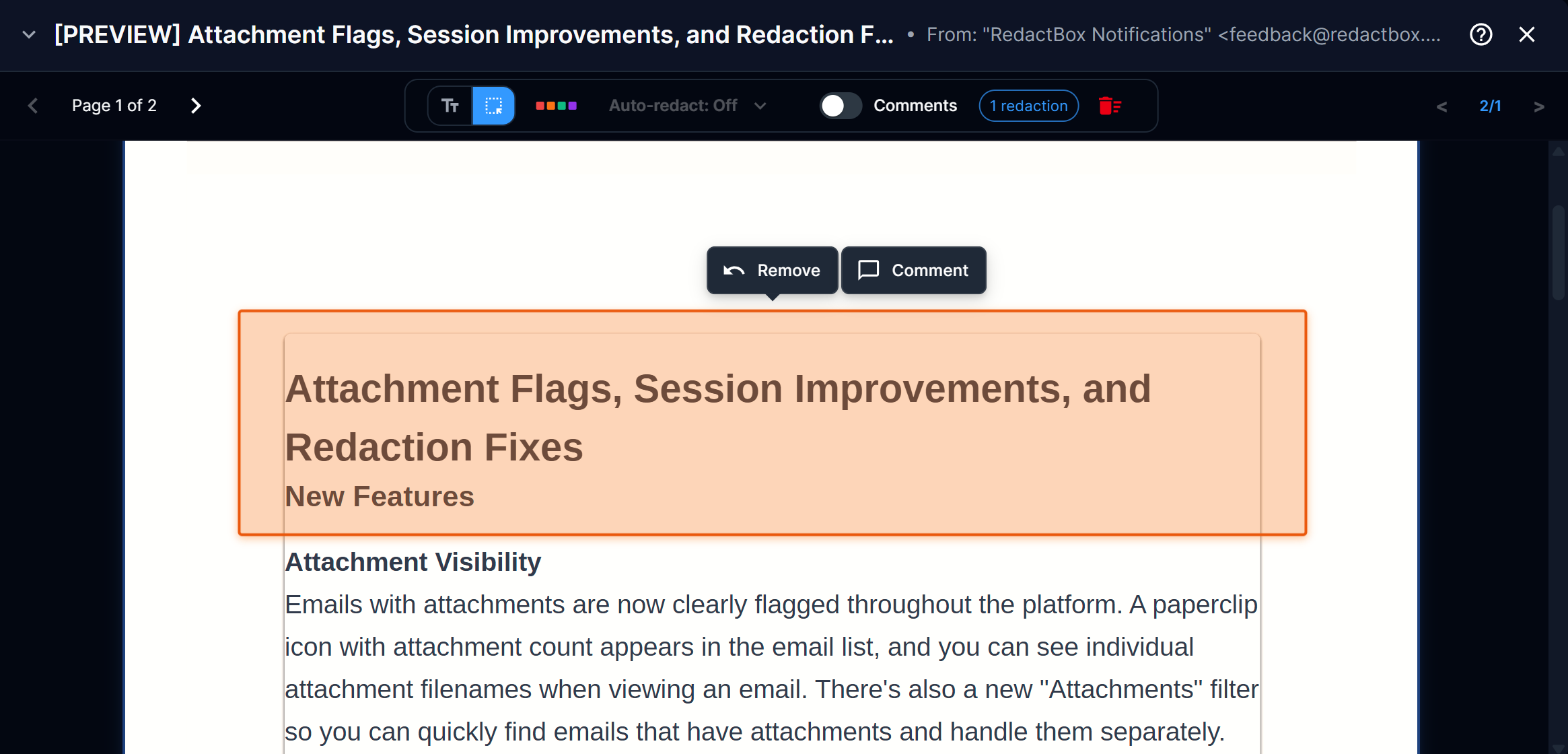
Not everything in a document is selectable text. Scanned pages, embedded images, signatures, logos, and handwritten notes — until now, these couldn't be redacted. With area-based redaction, you can draw a rectangle over any part of the page to mark it for removal, without selecting any text.
Draw to redact — Click and drag to draw a rectangle over any part of the document, regardless of whether it contains selectable text
Orange highlight — Area redactions appear with a distinct orange overlay in previews, making them easy to distinguish from text-based redactions
Keyboard shortcuts — Press A to switch to area mode and T to switch back to text selection mode while in Redact view
Tool mode remembers your choice — Your selected mode stays active as you navigate between emails, so you don't have to keep switching back when redacting areas across multiple items
Solid black in exports — All redactions, including area-based ones, render as solid black bars in the final exported PDF
When to use it
A parent submits a Subject Access Request for their child's educational records. The school exports the relevant emails, but they're full of content that needs redacting before disclosure — scanned handwritten teacher notes attached to emails, photos embedded in safeguarding reports, other children's names appearing in screenshot images of the school's MIS system, and a staff member's signature block with a personal mobile number.
None of that is selectable text, so the standard text redaction tool can't touch it. With area-based redaction, you press A to switch to area mode and start drawing rectangles — over the handwritten notes mentioning other pupils, over the photo in the safeguarding email, over the MIS screenshot showing other children's data, over the signature with the personal number. As you navigate through each email, the tool stays in area mode, so you can work through the batch without interruption. When you reach the typed emails, press T to switch back to text selection, then use Search & Redact to catch any remaining names throughout the project. Everything exports with solid black bars, ready for disclosure.
Check out our help centre for instructions on how to use Area Redaction!
https://help.redactbox.co.uk/en/articles/7805395-area-redaction
March 2nd, 2026
New
Improved
Fixed
New
Drag & drop anywhere — Drag files anywhere on the page to upload them, not just the sidebar. A polished full-page overlay appears showing supported formats and which project you're uploading to.
Smooth animations — The overlay fades in with a floating cloud icon and slides out smoothly when you drag away.
PDF drag & drop support — PDF files are now accepted via drag & drop (previously only worked through the file browser).
Improved
Clear Data moved to user menu — The reset/clear data button has been moved from the header toolbar into the user menu to prevent accidental clicks. It now asks you to type to confirm that you want to delete the data within your project.
Bulk redaction progress — The progress indicator no longer pushes the toolbar buttons around. It now appears cleanly in the header without shifting the workflow step, tools, or filter button.
Bulk redaction auto-dismiss — The progress notification now automatically dismisses after 20 seconds once complete, cancelled, or errored. You can still dismiss it manually at any time.
Upload dialog drag reliability — Fixed a flickering issue where the drag highlight would flash on and off when moving your cursor over the upload dialog's drop zone.
File size limit consistency — Drag & drop now accepts files up to 3 GB, matching the upload dialogue limit.
Action chip display — Fixed truncation and clipping of action chips in the email list and improved spacing.
Fixed
Fixed full-page drag overlay appearing behind the upload dialogue when it was already open.
Fixed dropping files while the upload dialogue was open, potentially triggering duplicate uploads.
Fixed clearData() error that could occur in Firefox when dropping files.
Added missing PDF icon in the upload dialogue file list.